Voor jouw deur
De bezoeker gebruikt jouw persoonlijke Knockly-plaatje. Niet één gezamenlijke code voor het hele portiek.
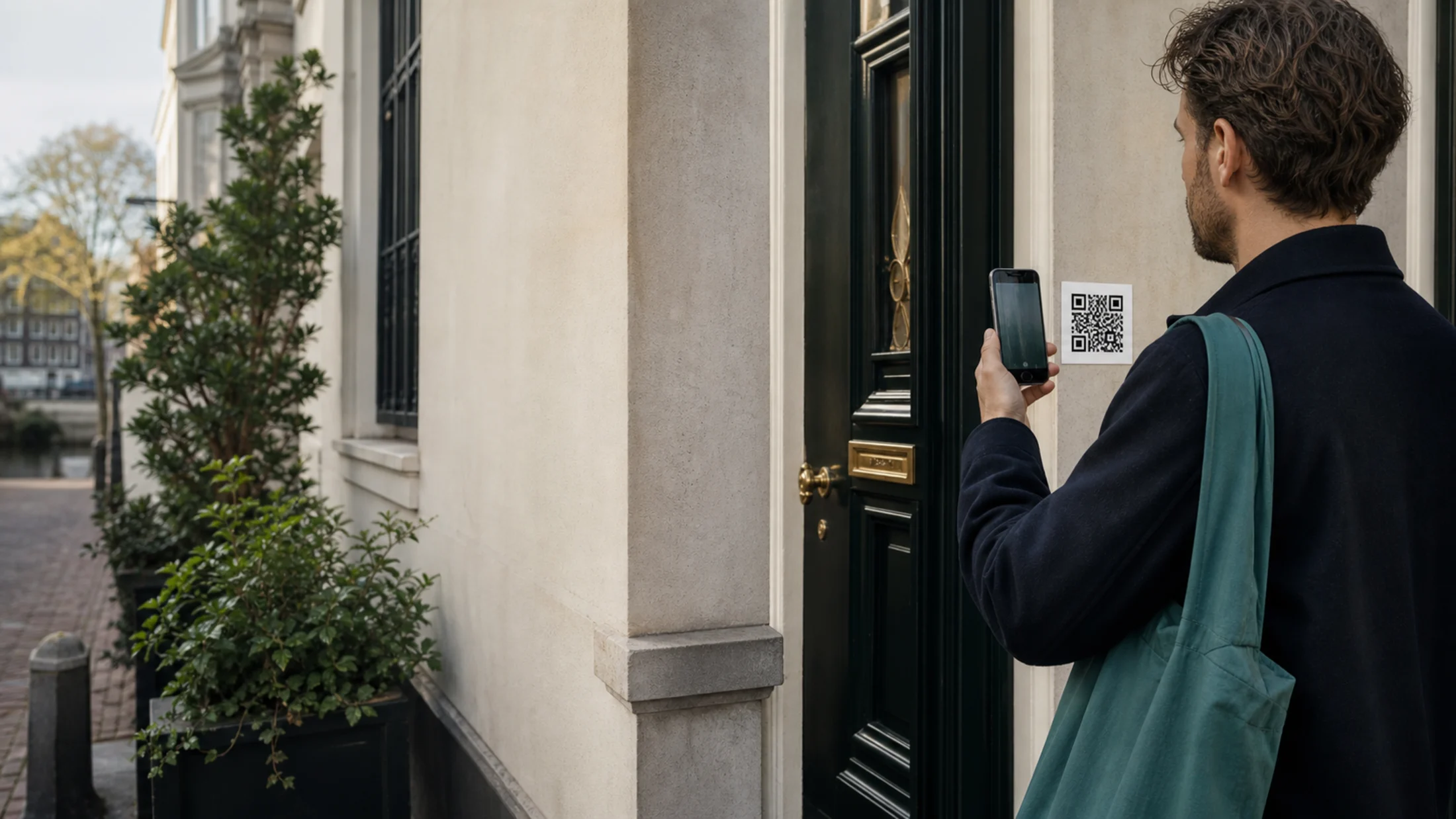
Zonder vaste camera. Geen dure hardware. Geen beelden van buren of het portiek. Alleen contact wanneer iemand echt aanbelt.

Beheer je deuren en neem je digitale deurbel aan vanaf je iPhone, iPad of Android-telefoon.

Met Knockly zie en hoor je wie er aanbelt, zonder dat er de hele dag een camera op de entree gericht staat. De verbinding ontstaat pas wanneer een bezoeker bewust aanbelt.
Start met KnocklyEen klassieke videodeurbel maakt de camera het product. Knockly maakt het aanbellen zelf het product, met privacy ingebouwd in de flow.
Een bezoeker staat voor jouw deur en gebruikt jouw persoonlijke digitale deurbel. De bezoeker geeft eerst camera- en microfoontoestemming, zodat jij ziet wie er staat voordat je antwoordt.
Start met KnocklyDe bezoeker gebruikt jouw persoonlijke Knockly-plaatje. Niet één gezamenlijke code voor het hele portiek.
Knockly toont een weboproep met video, audio of bericht als duidelijke keuzes.
De bezoeker geeft camera- en microfoontoestemming vóór het aanbellen. Jouw camera en microfoon blijven uit tot je antwoordt.
Een eigen digitale deurbel zonder het gedeelde portiek te filmen.
Respect voor het gebouw, de buren en de voordeur.
Activeer of vervang een code wanneer gasten wisselen.
Laat gasten en schoonmakers aanbellen zonder extra hardware.
Familie of zorg kan sneller bij de juiste persoon uitkomen.
Een professionele bezoekersflow zonder receptiebalie.
Simpel aanbellen voor afspraken en bezorgingen.
Een plaatje per bewoner of kamer.
Discreet en rustig voor cliënten aan de deur.
Knockly is begonnen in Amsterdam, waar veel voordeuren een portiek of gedeelde entree delen. Een klassieke videodeurbel filmt vaak meer dan alleen je eigen bezoek. Wij wilden hetzelfde gemak, zonder vaste camera gericht op buren, voorbijgangers of de gedeelde entree. Daarom bouwden we een deurbel die begint op de telefoon van de bezoeker, alleen wanneer iemand bewust aanbelt.
Start met KnocklyMaak je account aan, voeg je deur toe en download je persoonlijke Knockly-plaatje.
Start met KnocklyBegin klein. Upgrade wanneer je meer deuren, bewoners of historie nodig hebt.
Voor het rustig testen van Knockly bij één entree.
Gratis starten. Geen betaalkaart nodig.
Voor thuis en kleine gedeelde entrees.
per maand · jaarbetaling met twee maanden voordeel · 1 watervaste deursticker inbegrepen bij jaarbetaling
Voor kantoren, praktijken en beheerde woonlocaties.
per maand · jaarbetaling met twee maanden voordeel · 5 watervaste deurstickers inbegrepen bij jaarbetaling
Wil je Knockly gebruiken voor een appartement, gedeelde entree of zakelijke locatie? Stuur een bericht, dan reageren we persoonlijk.
Nee. De bezoeker gebruikt jouw persoonlijke digitale deurbel via een gewone mobiele webpagina.
Ja. Knockly heeft geen vaste camera op de entree gericht. De bezoeker geeft eerst toestemming en er is alleen contact wanneer iemand echt aanbelt.
Nee. Knockly neemt livegesprekken niet op en slaat de live video of audio niet op. Alleen noodzakelijke oproepgegevens, zoals tijdstip en status, kunnen in je oproephistorie staan.
Knockly is een Europees bedrijf, ontwikkeld in Amsterdam.
Nee. Het Knockly-plaatje is gedrukt materiaal; alleen de telefoons en webapp gebruiken stroom.
Ja. Je kunt met audio antwoorden wanneer video niet nodig of niet gewenst is.
Ja. Met betaalde pakketten kan een eigenaar of beheerder bestaande Knockly-accounts toevoegen.
De bezoeker kan een tekstbericht achterlaten of een videoboodschap van maximaal 30 seconden opnemen.
Ja. Je kunt een deurcode intrekken en vervangen door een nieuwe veilige code.
Ja. Knockly werkt in moderne mobiele browsers via HTTPS.